
在 WordPress 网站中,FAQ 页面是展示产品常见问题的重要组件。使用 JetEngine 配合 Elementor,可以灵活创建交互式手风琴 FAQ,同时通过 JSON-LD Schema 实现富媒体搜索结果展示。本文将完整讲解实现方案与常见问题排查。
一、什么是 JetEngine Repeater
JetEngine 是 Crocoblock 出品的 WordPress 插件,核心功能包括:
- Dynamic Listing:自定义文章类型循环展示
- Repeater Field:可重复字段的列表生成器
- Taxonomy Manager:自定义分类法管理
- Meta Boxes:后台自定义字段
Repeater 字段允许用户在后台编辑器中以”问答对”形式批量录入 FAQ,前端则通过 Dynamic Tag 或 Shortcode 循环渲染。
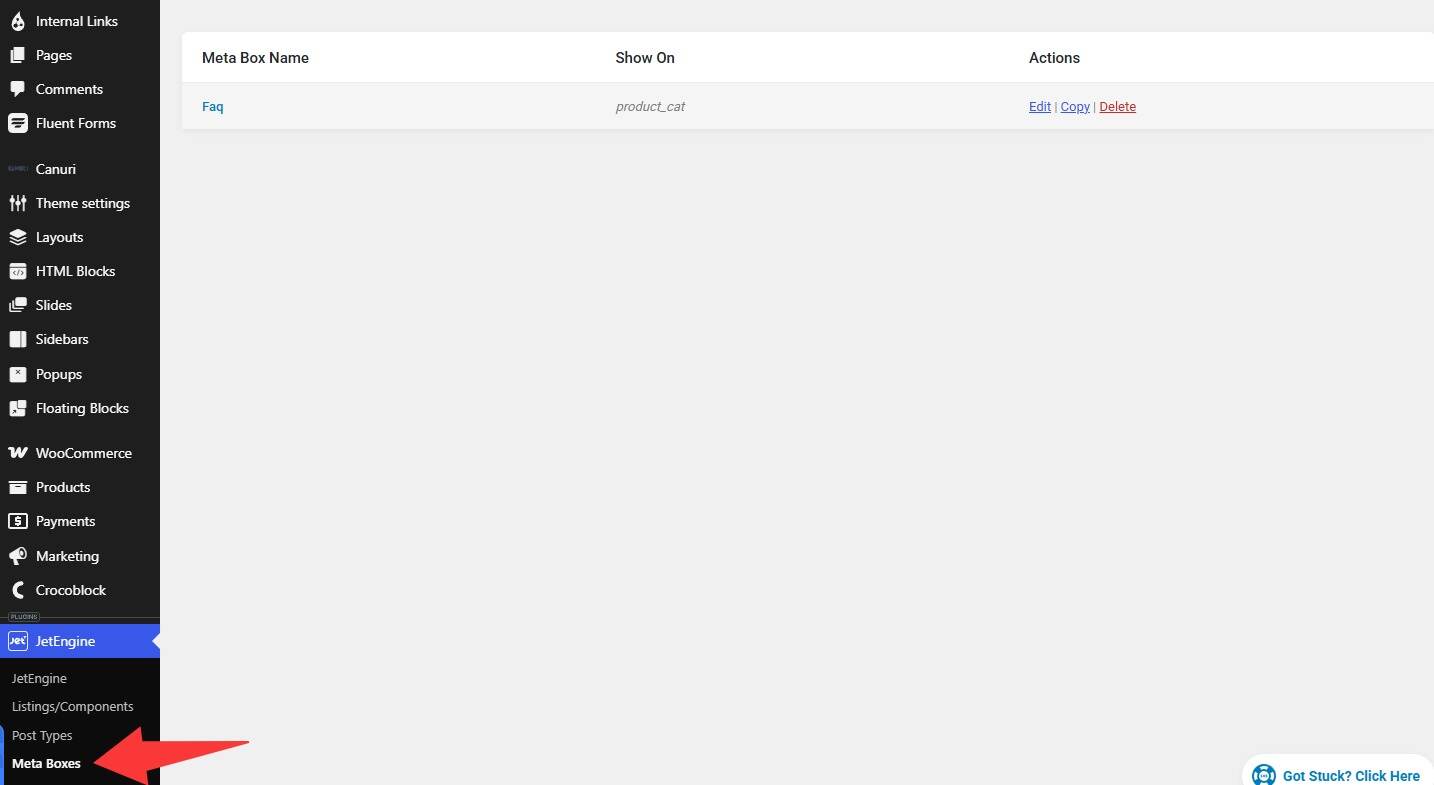
进入 JetEngine – meta boxes创建一个FAQ
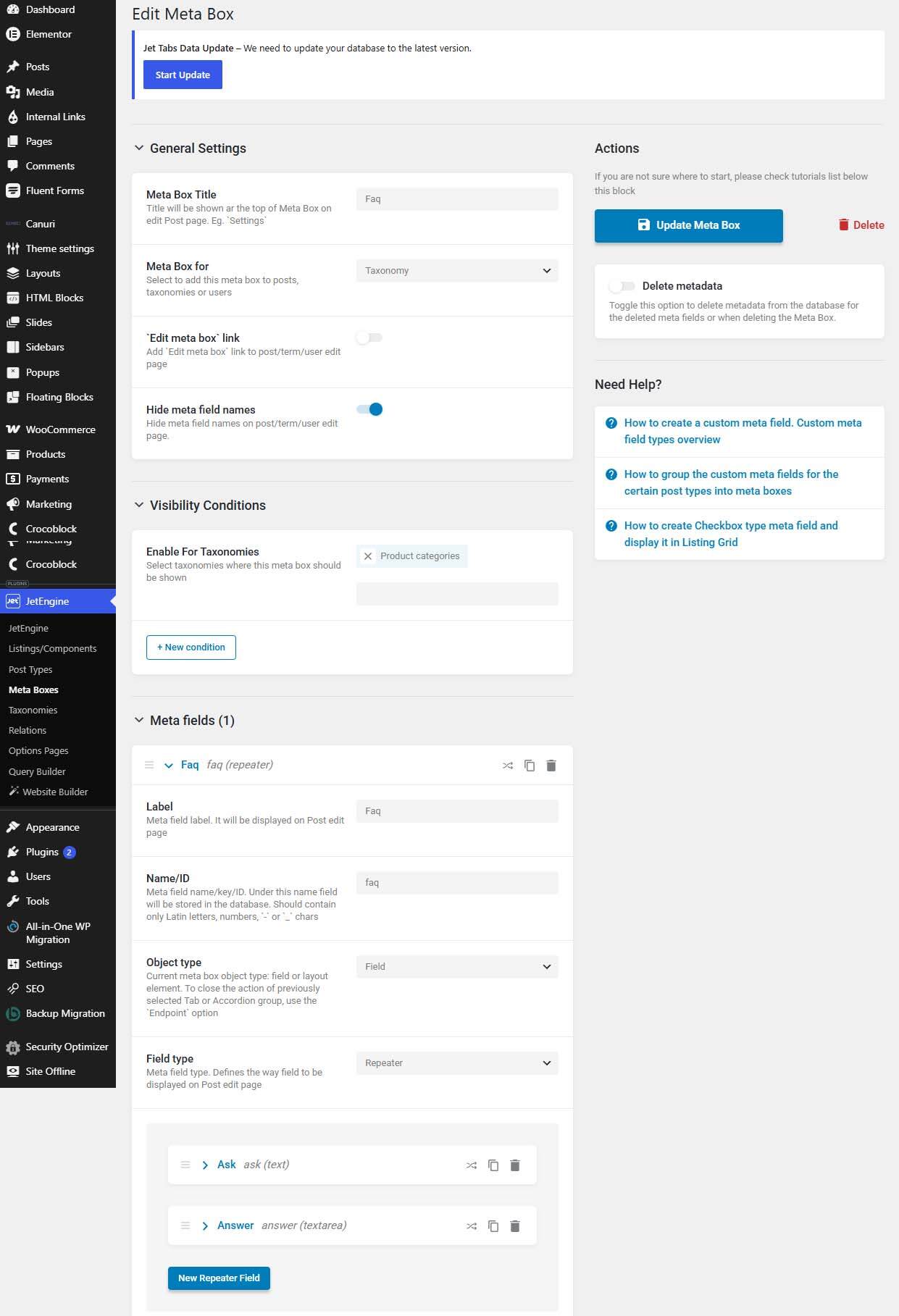
Meta boxes For : Taxonomy
Enable For Taxonomies : Product categories
Meta Fields 创建一个Repeater Field分别添加2个Text字段: Ask 和 Answer
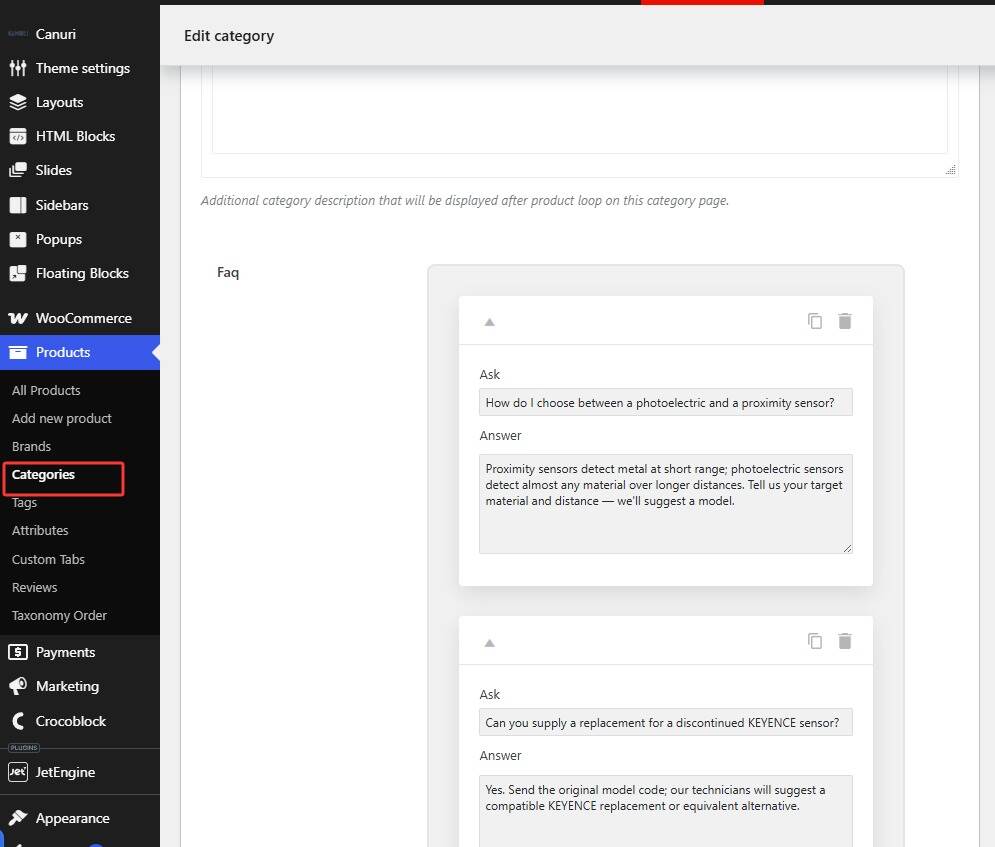
编辑产品分类,为不同分类添加不同的FAQ
二、HTML 结构
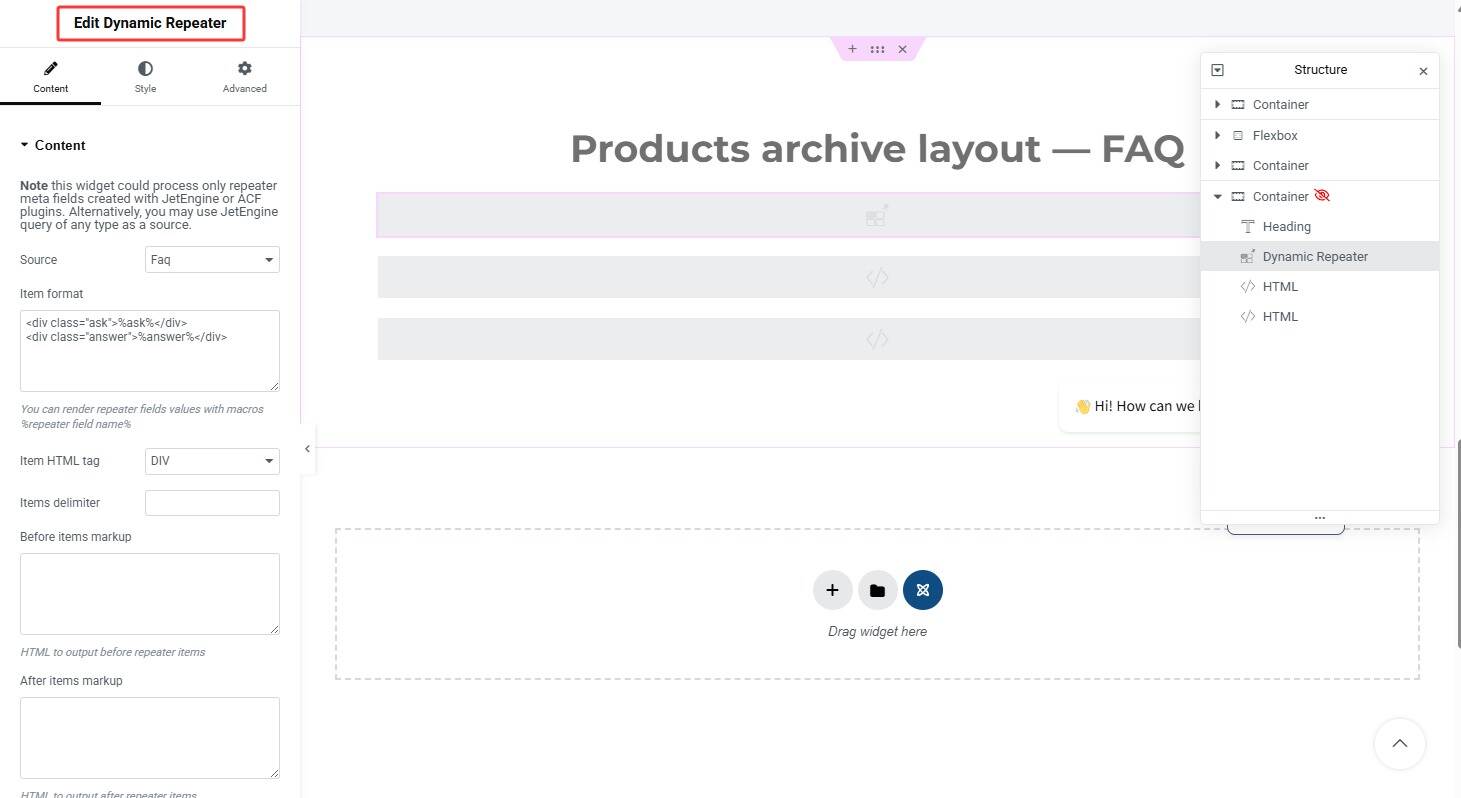
JetEngine Repeater 默认生成的 HTML 结构如下:
<div class="ask">%ask%</div>
<div class="answer">%answer%</div>
.ask 是点击展开的问题标题,.answer 是对应的答案内容。
三、CSS 样式实现手风琴效果
以下是完整的 CSS 代码,支持卡片布局、渐变图标和响应式适配:
<style>
.jet-listing-dynamic-repeater__items {
  display: block;
  width: 100%;
  max-width: 860px;
  margin: 0 auto;
}

.jet-listing-dynamic-repeater__item {
  display: block;
  width: 100%;
  background: #ffffff;
  border: 1px solid #e5e7eb;
  border-radius: 10px;
  margin-bottom: 12px;
  box-shadow: 0 1px 3px rgba(16, 24, 40, 0.05);
  overflow: hidden;
  box-sizing: border-box;
}

.jet-listing-dynamic-repeater__item .ask {
  position: relative;
  padding: 16px 20px 16px 48px;
  cursor: pointer;
  font-weight: 700;
  font-size: 16px;
  line-height: 1.5;
  color: #1e3a5f;
  user-select: none;
  transition: background-color 0.2s ease;
}

.jet-listing-dynamic-repeater__item .ask:hover {
  background-color: #f9fafb;
}

/* +/- 图标(纯 CSS 实现) */
.jet-listing-dynamic-repeater__item .ask::before,
.jet-listing-dynamic-repeater__item .ask::after {
  content: "";
  position: absolute;
  left: 20px;
  top: 50%;
  background: #6b7280;
  transition: transform 0.3s ease;
}

.jet-listing-dynamic-repeater__item .ask::before {
  width: 2px;
  height: 12px;
  margin-top: -6px;
}

.jet-listing-dynamic-repeater__item .ask::after {
  width: 12px;
  height: 2px;
  margin-top: -1px;
  left: 15px;
}

/* 展开状态:图标旋转 45 度变为 × */
.jet-listing-dynamic-repeater__item.active .ask::before,
.jet-listing-dynamic-repeater__item.active .ask::after {
  transform: rotate(45deg);
}

/* 答案内容区域 */
.jet-listing-dynamic-repeater__item .answer {
  max-height: 0;
  overflow: hidden;
  padding: 0 20px;
  color: #4b5563;
  font-size: 15px;
  line-height: 1.75;
  transition: max-height 0.4s ease, padding 0.4s ease;
}

/* 展开状态 */
.jet-listing-dynamic-repeater__item.active .answer {
  max-height: 600px;
  padding: 0 20px 18px;
}

/* 响应式适配 */
@media (max-width: 768px) {
  .jet-listing-dynamic-repeater__item .ask {
    padding: 14px 16px 14px 40px;
    font-size: 15px;
  }
  .jet-listing-dynamic-repeater__item .ask::before { left: 16px; }
  .jet-listing-dynamic-repeater__item .ask::after { left: 12px; }
  .jet-listing-dynamic-repeater__item .answer { font-size: 14px; }
}

@media (max-width: 480px) {
  .jet-listing-dynamic-repeater__item .ask {
    padding: 12px 14px 12px 36px;
    font-size: 14px;
  }
  .jet-listing-dynamic-repeater__item .answer { font-size: 13px; }
}
</style>
运行效果如下
关键要点
- 使用
max-height过渡而非height,避免 JS 测量问题 - 图标用
::before+::after实现,无需额外元素 transform: rotate(45deg)将+变为×
四、JavaScript 交互实现
以下是完整的交互脚本,包含点击展开、键盘支持、默认展开第一项等功能:
<script>
(function () {
  var SELECTOR = '.jet-listing-dynamic-repeater__item';
  var items = document.querySelectorAll(SELECTOR);

  items.forEach(function (item) {
    var ask = item.querySelector('.ask');
    if (!ask) return;

    // 无障碍支持
    ask.setAttribute('role', 'button');
    ask.setAttribute('tabindex', '0');

    // 点击事件:单选模式
    ask.addEventListener('click', function () {
      var isOpen = item.classList.contains('active');
      items.forEach(function (i) { i.classList.remove('active'); });
      if (!isOpen) item.classList.add('active');
    });

    // 键盘支持:Enter / Space 触发
    ask.addEventListener('keydown', function (e) {
      if (e.key === 'Enter' || e.key === ' ') {
        e.preventDefault();
        ask.click();
      }
    });
  });

  /* 清除旧代码遗留的内联样式 */
  items.forEach(function (item) {
    var a = item.querySelector('.answer');
    if (a && a.style.maxHeight) a.style.maxHeight = '';
    if (a && a.style.padding) a.style.padding = '';
  });

  /* 默认展开第一个 FAQ 项 */
  var hasActive = Array.prototype.some.call(items, function (i) {
    return i.classList.contains('active');
  });
  if (!hasActive && items.length) {
    items[0].classList.add('active');
  }
})();
</script>

<script>
(function () {
  var items = document.querySelectorAll('.jet-listing-dynamic-repeater__item');

  items.forEach(function (item) {
    var ask = item.querySelector('.ask');
    if (!ask) return;
    ask.setAttribute('role', 'button');
    ask.setAttribute('tabindex', '0');

    ask.addEventListener('click', function () {
      var isOpen = item.classList.contains('active');
      items.forEach(function (i) { i.classList.remove('active'); });
      if (!isOpen) item.classList.add('active');
    });

    ask.addEventListener('keydown', function (e) {
      if (e.key === 'Enter' || e.key === ' ') {
        e.preventDefault();
        ask.click();
      }
    });
  });

  /* 防御:清除 answer 上残留的内联 max-height/padding */
  items.forEach(function (item) {
    var a = item.querySelector('.answer');
    if (a && a.style.maxHeight) a.style.maxHeight = '';
    if (a && a.style.padding) a.style.padding = '';
  });

  /* 默认展开第一个:页面上没有任何 active 项时,自动给第一个加上 */
  var hasActive = Array.prototype.some.call(items, function (i) {
    return i.classList.contains('active');
  });
  if (!hasActive && items.length) {
    items[0].classList.add('active');
  }
})();
</script>
注意事项
- 不要使用
scrollHeight:移动端动态计算会出错,使用固定max-height: 600px更稳定 - 防御残留内联样式:旧版本代码可能在
.answer上写入style="max-height:...",执行前需清除
五、FAQPage Schema 自动生成
Schema.org 的 FAQPage 类型可以为 Google 等搜索引擎提供富媒体搜索结果展示。以下是自动从 DOM 提取并注入 JSON-LD 的脚本:
关键逻辑
alreadyHasFAQSchema():避免与 SEO 插件(RankMath、Yoast、SEOPress)冲突MutationObserver:监听 DOM 变化,确保 JetEngine 动态加载后仍能注入- 类名
faq-schema-jsonld作为标记,防止脚本重复执行
六、完整部署方案
方案 A:单个 HTML 组件(推荐)
将 CSS + JS + Schema 合并放入一个 HTML 组件,放在 JetEngine Listing 之后:
<style> /* 此处粘贴 CSS 代码 */ </style> <script> /* 此处粘贴交互 JS 代码 */ </script> <script> /* 此处粘贴 Schema 生成 JS 代码 */ </script>方案 B:分开放置
- CSS → Elementor 页面设置 → 高级 → 自定义 CSS(或主题选项)
- 交互 JS → HTML 组件(放在 FAQ Listing 之后)
- Schema JS → HTML 组件(可合并到同一组件)
七、常见问题排查
问题 1:Schema 没有生成
原因:可能是 alreadyHasFAQSchema() 检测到已有 Schema,或 DOM 元素未加载完成。
排查方法:
1. 按 F12 打开开发者工具
2. 在 Elements 面板搜索 faq-schema-jsonld
3. 检查 Console 是否有报错
解决:清除浏览器缓存,或临时禁用 SEO 插件测试。
问题 2:点击无法展开
原因:交互 JS 未部署,或 jQuery 冲突。
// 在 Console 中执行,检查元素是否存在 document.querySelectorAll('.jet-listing-dynamic-repeater__item').length解决:确认 JS 代码已正确添加到页面,且在 DOM 加载后执行。
问题 3:默认没有展开第一项
原因:缺少默认展开逻辑,或元素加载时序问题。
解决:在脚本末尾添加默认展开逻辑(见第四节代码)。
问题 4:移动端高度异常
原因:使用了 scrollHeight 动态计算,移动端与桌面端高度不同导致溢出或截断。
解决:改用固定 max-height: 600px,不要使用 JS 测量高度。
八、验证与测试
8.1 手动验证
部署后,在页面按 F12 → Console 执行:
// 检查 Schema 是否存在 document.querySelector('script.faq-schema-jsonld')?.textContent // 检查交互是否正常 document.querySelectorAll('.jet-listing-dynamic-repeater__item')[0].classList.contains('active')8.2 工具验证
- Google Rich Results Test:search.google.com/test/rich-results
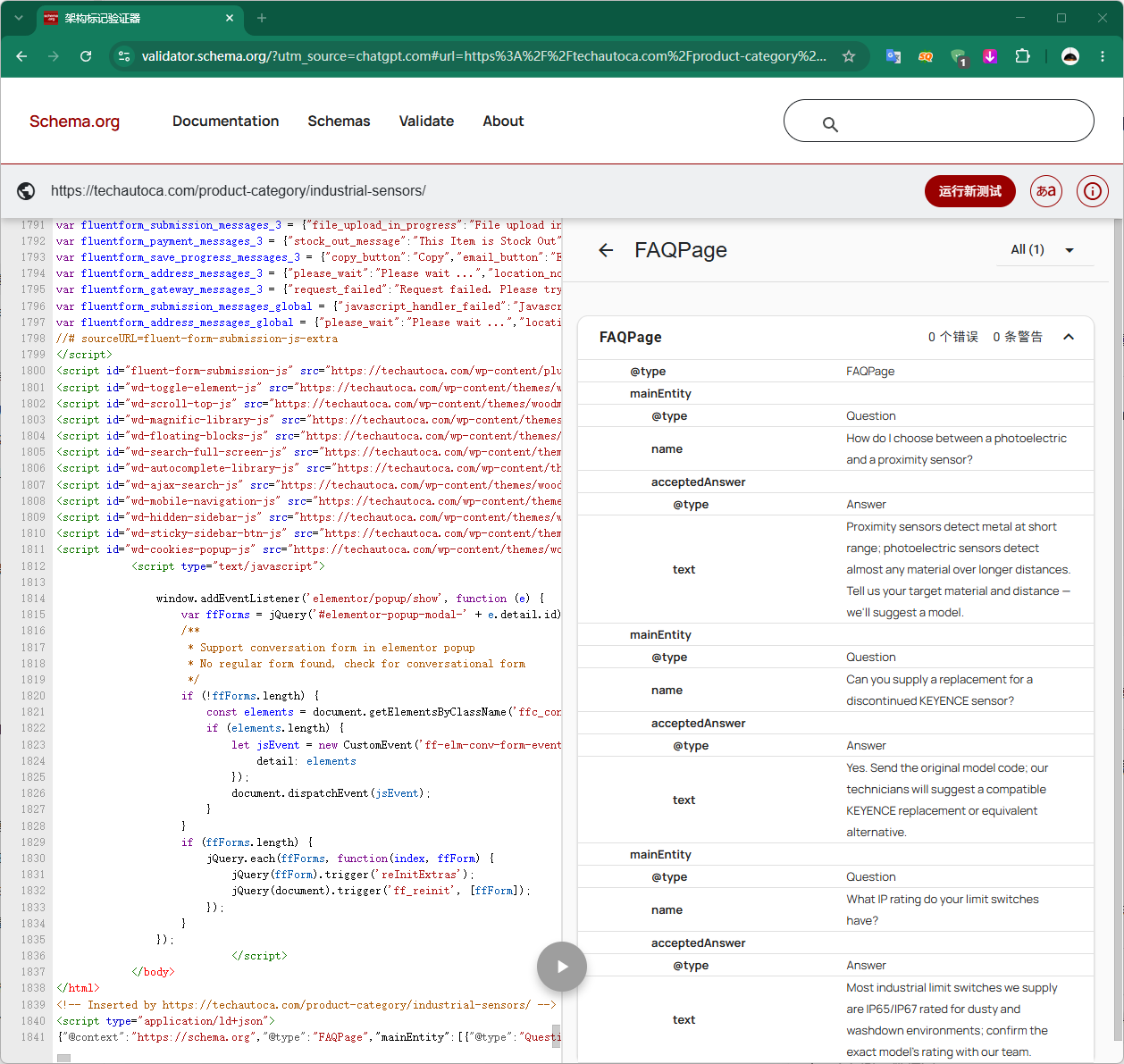
- Schema Markup Validator:validator.schema.org
- Browser DevTools:检查 Network 面板的 HTML 响应中是否包含 JSON-LD
九、总结
通过 JetEngine Repeater + Elementor + 自定义 CSS/JS,可以高效实现:
- 美观的手风琴 FAQ:卡片样式、渐变图标、响应式适配
- 完善的交互体验:点击展开、键盘支持、默认展开
- SEO 友好的 Schema:自动生成 FAQPage JSON-LD,支持富媒体搜索结果
核心要点:
- 避免使用
scrollHeight,改用固定max-height - Schema 生成需检测已有标记,避免冲突
- 使用
MutationObserver处理动态加载场景 - 部署后务必验证 Schema 是否生效